 Prahari प्रहरी
Know how much AI coding time you have left.
Prahari lives in your Mac's menu bar and shows your Claude Code, Codex and Antigravity limits: what's left in each 5-hour and weekly window, how long it lasts at your pace, and when it resets.
macOS 14 Sonoma or later · Free to start · Everything stays on your Mac
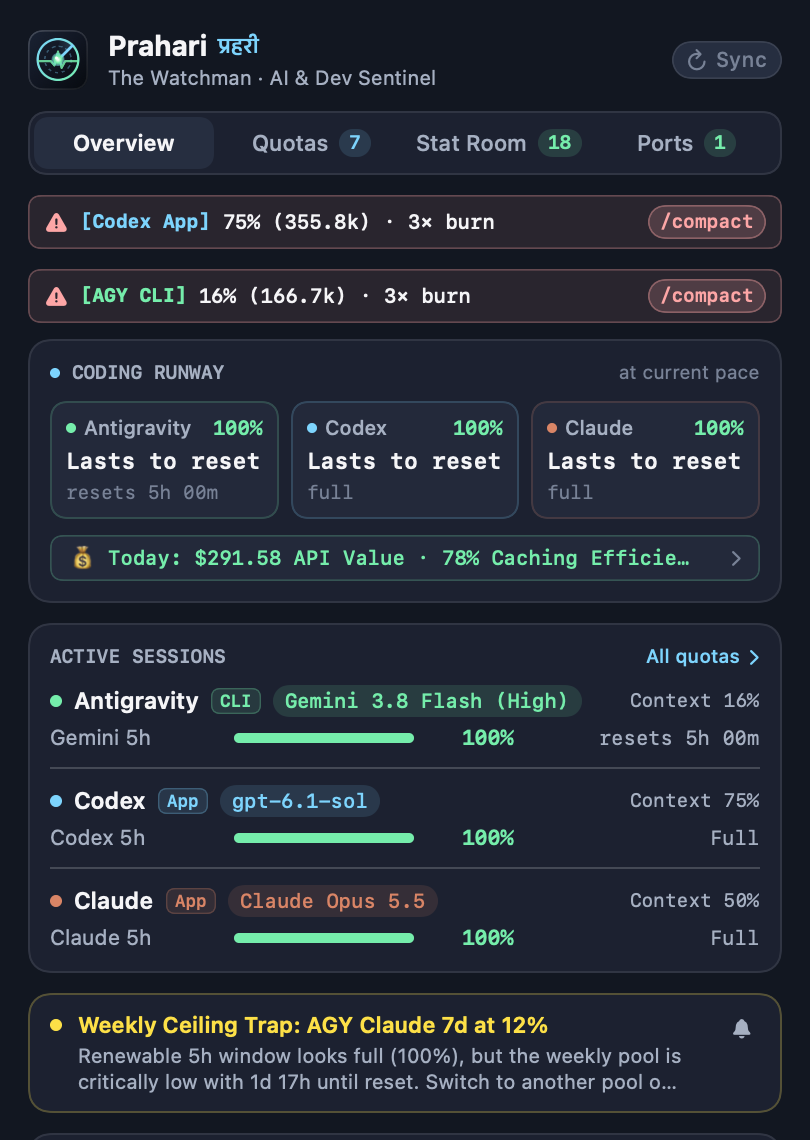
Every limit, one glance.
Prahari reads the usage files your coding agents already write, so the numbers match what each tool would tell you, without opening it.
Your % at a glance
See the agents you used in the last hour, or pick a single one. Claude modes show 5h, 7d, or time to reset.
How long it lasts
At your current pace, will this window last until it resets, or run out in 40 minutes?
A nudge before you hit zero
One notification at 20% and 10% left, and another when a window refills. Never repeated.
Which pool to use next
When one agent is nearly out, Prahari points you to the one with the most headroom.
Compaction warnings
Shows when a session's context is nearly full, with the command to compact it.
What your plans are worth
API value of your usage, plan payback, model split, 7-day to 12-month history and today's commits.
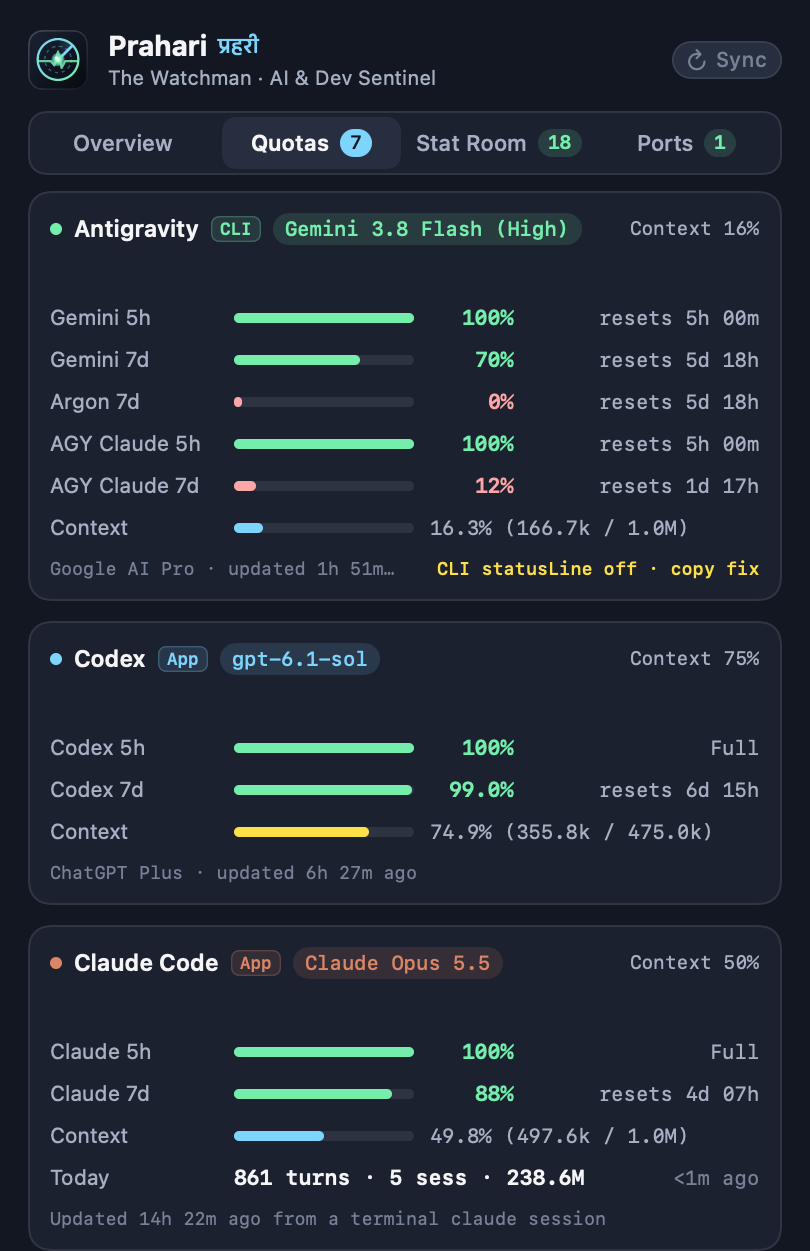
One layout for every agent.
Each window gets a bar, the percent left and its reset time. Agents you don't have installed simply don't appear.
- ✓5-hour and weekly windows for Claude Code, Codex and Antigravity's Gemini, Argon and Claude pools.
- ✓Context per session, so you know when to compact.
- ✓Localhost dev servers with their project and git branch, and one-click restart.
Your usage never leaves your Mac.
Prahari has no server and no analytics. It reads files on your Mac and shows them to you.
No passwords by default
Out of the box, Prahari reads only the usage files your agents write. It never asks for a login.
Live lookups are opt-in
If you turn one on, it uses that agent's own login and talks only to that agent's servers. Nothing is stored.
Easy to undo
One button removes every change Prahari made, like its Claude Code statusLine entry, before you delete the app.
Free for quota tracking.
Every feature is free while Prahari is new. Pro will add the deeper analysis once it launches.
Free
- Claude Code, Codex and Antigravity limits
- Menu bar modes and coding runway
- Low-quota and refill alerts
- Compaction warnings
Pro
- Everything in Free
- Stat Room: API value, plan payback, model split
- History up to 12 months, standup and showcase exports
- Dev server manager and project launchers
- Live quota lookups
Payments, tax and receipts are handled by Lemon Squeezy, our merchant of record. Cancel any time.
Good to know
Which tools does Prahari support?
Claude Code (terminal and the Claude desktop app's Code tab), OpenAI Codex (CLI and app) and Google Antigravity (CLI and IDE). It only shows the ones installed on your Mac.
Does it need my password or API keys?
No. Prahari reads the usage files these tools already save on your Mac. Optional live lookups use the tool's own saved login, only after you turn them on.
Where do the numbers come from?
From each tool's own records: Claude Code's statusLine and transcripts, Codex's session files and Antigravity's local state. Prahari doesn't estimate your limits; it reads them.
How do updates work?
Prahari checks for signed updates once a day and installs them when you agree. Every update is signed, so only genuine Prahari releases are installed.
Can I get a refund?
Yes, within 14 days of your first Pro payment. See the refund policy.